
Records and transcribes meetings on your device, then lets an assistant search them.
- Started in our test
- ★ 1.6K GitHub stars
- 1.6K downloads a week
- Last commit 26 Oct 2026
What is Minutes?
Minutes is a free, open source app by Mat Silverstein that records and transcribes meetings on your own device and lets an assistant search them over MCP.
Minutes, by Mat Silverstein, records and transcribes meetings, calls, voice memos and dictation on your own computer, and saves each one as a Markdown file with structured YAML for decisions and action items in ~/meetings. Its MCP server lets an assistant search those files, pull up decisions and open action items, prepare for a meeting with a person and start or stop a recording.
Transcription runs locally with Whisper or Parakeet, so audio stays on your machine. Text only leaves when the assistant you connect reads it. You can try it without a microphone: a demo command adds five sample meetings to ask about.
- Made by
- Mat Silverstein (silverstein) and contributors
- Licence
- MIT
- Latest version
- 0.31.0 (27 Oct 2026)
- npm package
- minutes-mcp
- GitHub stars
- 1.6K
- Downloads
- 1.6K a week
- Last commit
- 26 Oct 2026
- Tools
- 34
- Runs on
- Your computer
- Setup checked
- 27 Oct 2026
- Page updated
- 27 Oct 2026
Our check: We ran this exact config on 27 Oct 2026: it started and answered with 34 tools.
MCP Shelf take
We started Minutes on our own test machine on 27 Oct 2026 and it answered with 34 tools. 20 of the 34 only read; the other 14 can change things. Every tool comes with a useful description, all of them say whether they change things, and the tool list costs about 3,200 tokens of context before you ask a thing. It sits 15th of 16 in its category on our shelf by GitHub stars (1.6K, with 1.6K downloads a week).
What can Minutes read and change?
It can read
- Meeting transcripts, summaries and voice memos in your meetings folder
- Desktop context and screenshots captured around meetings, if you turned that on
It can change
- New recordings and transcripts, when it records or processes audio
- Summaries and the knowledge base, when asked to re-summarise or ingest
Safer setup: Mark sensitive meetings as restricted, which keeps them out of agent tools, and set MINUTES_MCP_AUTO_SETUP=0 for a client that should only read.
What's in the pod
What tools does Minutes have?
We found 34 tools when we started it on 27 Oct 2026. 20 only read. The rest can change things, so keep your app's "ask before each tool call" setting on for them.
Runs commands1 tool · Can start programs or run code.
| Tool | What it is for |
|---|---|
process_audio | Transcribes an existing WAV file from your inbox or Downloads. |
Changes things13 tools · Can create, edit, send or delete.
| Tool | What it is for |
|---|---|
add_agent_annotation | Adds an attributed comment from an agent without editing the meeting file. |
add_note | Adds a timestamped note to the recording in progress. |
confirm_speaker | Kept for compatibility. Speaker confirmation has to be done in the app or CLI. |
ingest_meeting | Adds facts from a meeting to your knowledge base, if one is set up. |
knowledge_status | Shows and tidies the state of the knowledge base. |
resummarize_meeting | Re-runs the summary of an edited meeting, as a preview unless you confirm. |
start_copilot | Starts the real-time meeting copilot for a goal. |
start_dictation | Starts dictation mode. |
start_live_transcript | Starts transcribing in real time. |
start_recording | Starts recording, checking first whether a call app is open. |
stop_copilot | Stops the copilot without stopping the recording. |
stop_dictation | Stops dictation and writes out the text. |
stop_recording | Stops recording and transcribes, labels speakers and summarises it. |
Only reads20 tools · Looks things up and changes nothing.
| Tool | What it is for |
|---|---|
activity_summary | Summarises the desktop activity recorded around one meeting. |
consistency_report | Flags decisions that conflict and commitments that went stale across meetings. |
copilot_status | Shows whether the copilot is running. |
get_agent_annotations | Kept for compatibility. Not available over MCP. |
get_meeting | Returns a full transcript with speakers. |
get_meeting_insights | Returns the decisions, commitments and questions found in meetings, with confidence levels. |
get_moment | Shows the local rewind around a point in one meeting. |
get_person_profile | Builds a profile of someone from the meetings you had with them. |
get_screen_context | Returns up to three screenshots captured during one meeting. |
get_status | Tells you whether a recording is running. |
list_meetings | Lists recent meetings and voice memos. |
list_processing_jobs | Shows recordings waiting to be processed, done or failed. |
list_voices | Lists the voices enrolled for speaker identification. |
read_copilot_nudges | Reads the suggestions the copilot has made. |
read_live_transcript | Reads new lines of the live transcript. |
relationship_map | Shows who you meet, how often, and who you are losing touch with. |
research_topic | Pulls together what was said about a topic across meetings. |
search_context | Searches the desktop activity recorded around one meeting. |
search_meetings | Searches transcripts and voice memos. |
track_commitments | Lists open and overdue action items, optionally for one person. |
Grouped and described by us. The README on GitHub lists the inputs each tool takes.
How clearly it describes its tools to your assistant
- Tools with a description
- 34 of 34
- Say if they change things
- 34 of 34
- Context it takes, at least
- ~3,200 tokens
Every tool says whether it only reads or can change things, so a client can ask before the risky ones.
From the tool list it sent us. The token figure counts names, descriptions and input names; the full schemas your client loads add more.
How do I install Minutes?
Install steps from the Minutes README
The project's own instructions, copied from its README on GitHub on 27 Oct 2026 under its MIT licence. They are the source of truth; the ready-made configs further down are built from them. The rest of the README is in the README tab.
Install
Choose the desktop app or one standalone CLI installation. The desktop app includes a CLI: use About Minutes → Set up CLI to add it to your PATH.
brew install --cask silverstein/tap/minutes  # Desktop app, with bundled CLI
brew install silverstein/tap/minutes         # Standalone CLI alternative
cargo install minutes-cli                   # Standalone CLI via Cargo
For an agent connection, add the MCP server separately with
claude mcp add minutes -- npx -y minutes-mcp (or run npx minutes-mcp
from another MCP client).
If Homebrew reports an untrusted tap, run brew trust silverstein/tap once.
What you need first
- Node.js, for npx
- The Minutes CLI or desktop app; on a Mac the MCP server can install the CLI for you
- On Linux, glibc 2.39 or newer (Ubuntu 24.04) with the ALSA and PipeWire libraries
Add Minutes to your app
Pick your app for a ready-to-paste snippet and where it goes, built from the steps above.
Where it goes: Your terminal, in the project folder
claude mcp add minutes -- npx -y minutes-mcpInstall the Minutes desktop app or CLI first. Then run minutes demo --full to load five sample meetings and ask Claude about them before you record anything real.
Where it goes: ~/.cursor/mcp.json, or .cursor/mcp.json in a project
{
  "mcpServers": {
    "minutes": {
      "command": "npx",
      "args": [
        "-y",
        "minutes-mcp"
      ]
    }
  }
}
Where it goes: claude_desktop_config.json (Settings → Developer → Edit Config)
{
  "mcpServers": {
    "minutes": {
      "command": "npx",
      "args": [
        "-y",
        "minutes-mcp"
      ]
    }
  }
}
Where it goes: .vscode/mcp.json in your project
{
  "servers": {
    "minutes": {
      "type": "stdio",
      "command": "npx",
      "args": [
        "-y",
        "minutes-mcp"
      ]
    }
  }
}
Where it goes: ~/.codeium/windsurf/mcp_config.json
{
  "mcpServers": {
    "minutes": {
      "command": "npx",
      "args": [
        "-y",
        "minutes-mcp"
      ]
    }
  }
}
Where it goes: Not supported
ChatGPT only connects to remote servers by URL. This one runs on your computer, so use Claude, Cursor or VS Code.
Install the desktop app with "brew install --cask silverstein/tap/minutes" or the CLI with "cargo install minutes-cli", then run "minutes demo --full" to load sample meetings. Run "minutes setup --model small" before your first real recording.
Checked against the project's own install docs on 27 Oct 2026: silverstein/minutes README, github.com/silverstein/minutes/blob/main/docs/integration/clients.md, github.com/silverstein/minutes/blob/main/docs/install.md.
New to this? See the setup guides for Claude Code, Cursor, Claude Desktop and ChatGPT.
Minutes not working? Common fixes
- No speech detected
- The usual cause is microphone permission. Allow your terminal or Minutes.app in System Settings > Privacy & Security > Microphone.
- Recording from inside tmux captures silence
- tmux does not inherit your terminal's microphone permission. Record from a normal terminal window or the desktop app.
- The Linux binary will not start
- The prebuilt release needs glibc 2.39 (Ubuntu 24.04) and the ALSA and PipeWire libraries. Build from source on older systems such as Debian 12.
- Compressed audio does not import
- Install ffmpeg (or set MINUTES_FFMPEG to its path on Windows). WAV works without it.
How do I configure Minutes?
Names are exactly as the project spells them. Required ones are marked.
| Setting | What it does |
|---|---|
MEETINGS_DIREnvironment variable | Which folder of meetings the search and recall tools use. The default is ~/meetings./Users/you/meetings |
MINUTES_MCP_AUTO_SETUPEnvironment variable | Set to 0 to skip speech-model checks and downloads, for a client that only reads existing transcripts.0 |
config.tomlConfig | Minutes' own settings: the transcription model, the summariser, the knowledge base and recording options. |
Minutes FAQ
How do I add Minutes to Claude Code?
Install the app with brew install --cask silverstein/tap/minutes, or the CLI with cargo install minutes-cli, then run claude mcp add minutes -- npx -y minutes-mcp. Load sample meetings with minutes demo --full to try it.
Does Minutes work with Claude Desktop and Cursor?
Yes. Any MCP client can start the server with npx -y minutes-mcp, and the project has setup notes for Claude Desktop, Cursor, Codex, Gemini CLI and OpenCode.
Does my audio leave my computer?
No. Recording, transcription and storage happen locally, with Whisper or Parakeet. Text only goes out when a cloud assistant or summariser you chose reads it.
Can I try Minutes without recording a meeting?
Yes. minutes demo --full adds five sample meetings with no microphone needed, and minutes demo --clean removes them again.
Is Minutes free?
Yes. It is MIT licensed, and the author says nothing in the repository will move to a paid tier.
Is Minutes a Granola or Otter alternative?
It covers the same job of meeting notes, but stores everything as local Markdown files in ~/meetings instead of a hosted workspace. You can also import archives from Granola.
Can I keep some meetings away from the assistant?
Yes. Mark a meeting as restricted and the agent tools leave it out. Setting MINUTES_MCP_AUTO_SETUP to 0 stops the server installing the CLI on its own.
Why does Minutes record silence?
Usually the microphone permission is missing. Allow your terminal or Minutes.app under Privacy and Security, and avoid recording from inside tmux, which does not pass that permission on.
Minutes README
This is the project's own README from silverstein/minutes, written by Mat Silverstein (silverstein) and contributors, and shared under its MIT licence. We copied it on 27 Oct 2026, so the version on GitHub may be newer.
minutes
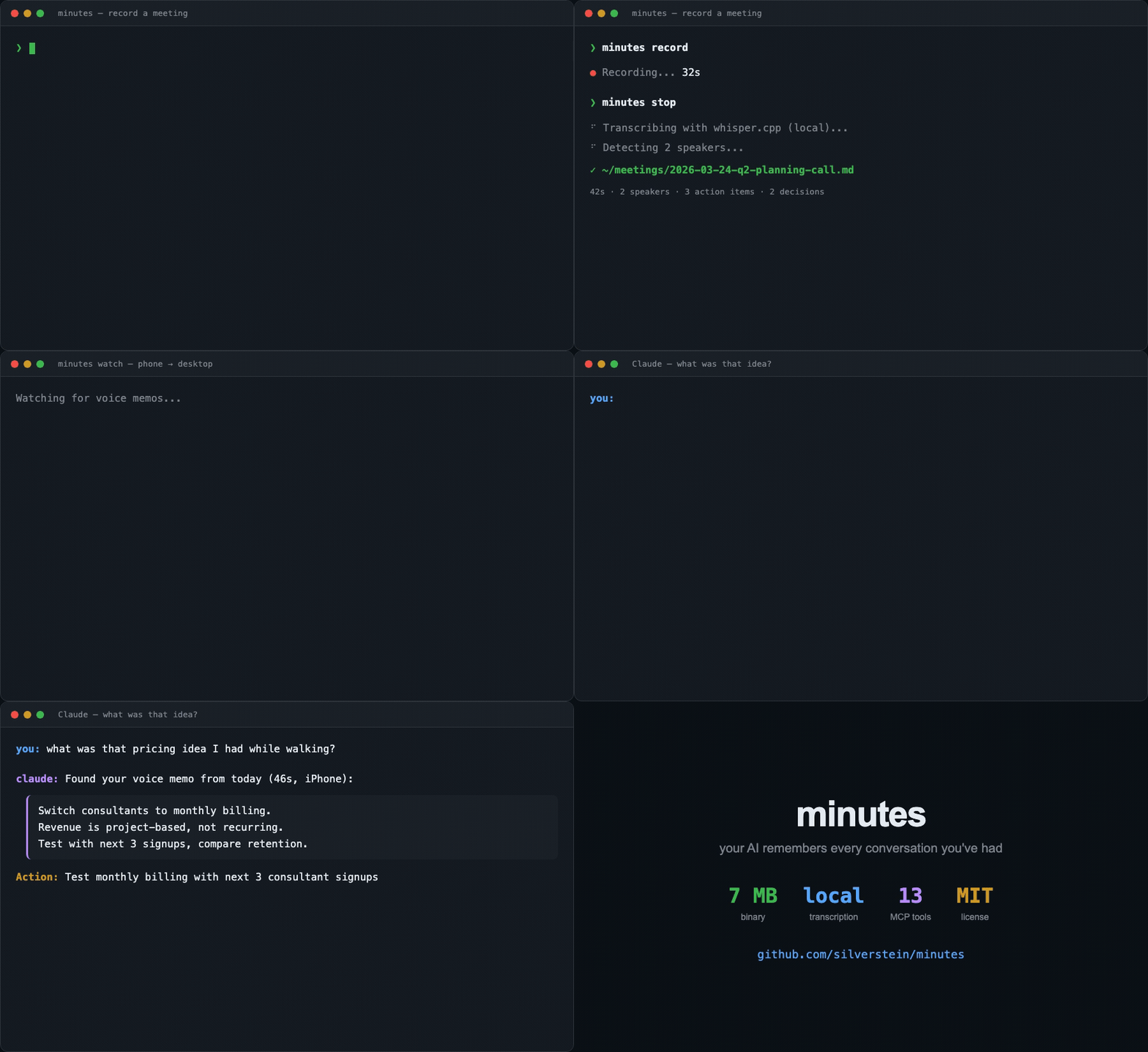
Minutes is a free, open-source conversation memory app for the AI you already use. Record and transcribe meetings, calls, voice memos, and dictation on your device, then let Claude Code, Codex, Cursor, or another MCP client search the history you choose to share. Your records are Markdown files you own in ~/meetings/.
Capture, transcription, and storage run locally. If you choose a cloud AI assistant or summarizer, the meeting context you authorize is sent to that provider.
Your conversations. Your memory. Ready for the AI you use.
Install
Choose the desktop app or one standalone CLI installation. The desktop app includes a CLI: use About Minutes → Set up CLI to add it to your PATH.
brew install --cask silverstein/tap/minutes  # Desktop app, with bundled CLI
brew install silverstein/tap/minutes         # Standalone CLI alternative
cargo install minutes-cli                   # Standalone CLI via Cargo
For an agent connection, add the MCP server separately with
claude mcp add minutes -- npx -y minutes-mcp (or run npx minutes-mcp
from another MCP client).
If Homebrew reports an untrusted tap, run brew trust silverstein/tap once.
Ask your agent
Add Minutes to your agent, seed five sample meetings (no mic needed), then ask about them:
claude mcp add minutes -- npx -y minutes-mcp
minutes demo --full
What did we decide about monthly billing, and did it stick?
The answer spans two meetings a month apart: launched on Feb 28, reversed on Mar 25.
A direct MCP call uses the same local meeting files:
search_meetings({"query":"monthly billing decision"})
Record a real one with minutes record, then minutes stop to transcribe. minutes demo --clean removes the samples.
Setup: Codex, Gemini CLI, and Claude Desktop,
Cursor,
OpenCode,
Pi,
Mistral Vibe, and
Cowork or Dispatch.
Works with
Claude Code · Codex · Cursor · OpenCode · Pi · Gemini CLI · Claude Desktop · Mistral Vibe · Cowork · Dispatch · Obsidian · Logseq · any MCP client
How it compares
| Workflow | Granola | Otter.ai | Anarlog (formerly Hyprnote) | Minutes |
|---|---|---|---|---|
| Product | Hosted meeting notepad | Hosted meeting assistant | Local meeting notepad | Local conversation memory |
| Agent access | Hosted MCP | Hosted integrations | CLI + MCP | Local files, MCP, CLI, SDK |
| Primary storage | Hosted workspace | Hosted workspace | Local SQLite + files | Local Markdown + YAML |
| Local AI | Cloud transcription | Cloud transcription | With local providers | Local transcription; AI provider of your choice |
Reviewed September 5, 2026 against Granola MCP, Otter privacy and security, and the Anarlog repository. Anarlog's community app is MIT; its enterprise components use a commercial license. See the detailed comparison and open-source alternatives for fit and limitations.
Who it's for
Agent-first users treat Minutes as the capture layer of a local second brain. They search meetings through Claude Code, Cursor, Codex, OpenCode, MCP, or the CLI, then fold useful context into a vault or wiki they own.
Desktop notetaker users record and read results in the app. They value reliable setup, clear processing and recovery, Recall, documents, Coach, and summary quality. See the full persona notes.
Surfaces
| Surface | What it provides | Docs |
|---|---|---|
| Desktop app | Menu bar capture, dictation, Recall, documents, and Coach. | Install |
| CLI (60 commands) | Local recording, processing, search, import, and automation. | Commands |
| MCP server (34 tools) | Local meeting tools and resources for any MCP client. | MCP reference |
| Claude Code plugin (23 skills) | Prep, capture, live help, debrief, and memory workflows. | Client setup |
| SDK | TypeScript access to meeting files without MCP. | Agent architecture |
Dictation
The desktop Dictation settings bring writing preferences, personal spellings and snippets, microphone selection, and recent text together. Cursor context is optional and stays on the Mac. Recovery restores text for review; local edits use an explicit Ollama preview, and spelling corrections require confirmation.
See dictation behavior and evaluation boundaries for supported fields, safe insertion and undo, clipboard restoration, and the synthetic benchmark.
Output format
Meetings are plain markdown with structured YAML frontmatter:
---
title: Q2 Pricing Discussion with Alex
type: meeting
date: 2026-03-17T14:00:00
duration: 42m
context: Discuss Q2 pricing
action_items:
  - assignee: mat
    task: Send pricing doc
    due: Friday
    status: open
decisions:
  - text: Test monthly billing with 10 advisors
---
See the frontmatter schema. Files work with Obsidian, grep, and any markdown tool.
Privacy & consent
- Transcription and speaker processing run on-device. Audio stays on your machine.
- Sensitive meetings save typed markers without audio and default to restricted.
- Consent reminders, acknowledgement, and provenance help you disclose recording.
- Text leaves the machine only when you send authorized context to a cloud agent or summarizer.
See the security documentation and consent enforcement design.
Docs
- Features and commands
- Install, setup, updating, and troubleshooting
- Agent and MCP client integrations
- Phone voice memo pipeline
- Summarization and automation
- Configuration
- Architecture and agent development
- Evidence, retrieval, and decision-history contracts
- Recall and speech evaluation
- Switching from Granola and importing archives
- Frontmatter schema
- Security
- Personas
- Native call capture recovery (
minutes recover-stem) - Opt-in automatic call recording for Teams and Zoom desktop on macOS
- MCP tools
- Error reference
- Agent index
- Full agent index
Contributing
See CONTRIBUTING.md. Minutes is MIT licensed and staying that way: no relicensing, no paid tier for anything in this repo.
MIT. Built by Mat Silverstein, founder of X1 Wealth.
Star History
Two peas, one chat
Chat with AI about Minutes
Opens a chat primed with Minutes’s README and setup docs from this page, or add it in Cursor to use its tools.
The Cursor button opens Cursor and asks before it adds the server. Fill in any keys it needs in Cursor’s MCP settings.
Peas in a pod
What are the alternatives to Minutes?
How Minutes lines up against its neighbours on the shelf. See every knowledge and work apps server.

MinutesThis pea
Records and transcribes meetings on your device, then lets an assistant search them.
- Tools
- 34
- Runs on
- Your computer
- Licence
- MIT
- Stars
- 1.6K

Ask an assistant about your Garmin activities, sleep, recovery and training.
- Tools
- 20
- Runs on
- Your computer
- Licence
- MIT
- Stars
- 1.4K
Notion's own server: search, read and update pages and databases.
- Tools
- 24
- Runs on
- Hosted or your computer
- Licence
- MIT
- Stars
- 4.7K

MCP Atlassian (Jira and Confluence)
Jira issues and Confluence pages, Cloud or self-hosted.
- Tools
- 98
- Runs on
- Your computer
- Licence
- MIT
- Stars
- 6K

Long-term memory as plain Markdown files you own.
- Tools
- 27
- Runs on
- Your computer
- Licence
- AGPL-3.0-or-later
- Stars
- 4.4K

Read LinkedIn profiles, companies and job posts with your own login.
- Tools
- 20
- Runs on
- Your computer
- Licence
- Apache-2.0
- Stars
- 4K
Something wrong on this page? Tell us.