
Lets an assistant explore and command a ROS or ROS 2 robot through rosbridge.
- Started in our test
- ★ 1.5K GitHub stars
- Last commit 25 Oct 2026
What is ROS MCP Server?
ROS MCP Server is an open source bridge from the robotmcp project that lets an assistant read topics, call services and send commands to a ROS or ROS 2 robot through rosbridge.
ROS MCP, from the robotmcp project, links a language model to a robot without touching the robot's code. You run rosbridge on the robot, and the server on your own computer connects to it over a WebSocket. The model can then list nodes, topics, services and actions, look up their message types, read sensor data and camera frames, publish commands, call services, send action goals and change parameters.
It works with ROS 2 releases such as Humble and Jazzy as well as ROS 1. Anything the model publishes reaches the real robot, so start in a simulator such as turtlesim or Gazebo and keep a hand near the stop button when you move to hardware.
- Made by
- The robotmcp project (robotmcp/ros-mcp-server)
- Licence
- Apache-2.0
- Latest version
- 3.1.2 (23 Sept 2026)
- PyPI package
- ros-mcp
- GitHub stars
- 1.5K
- Last commit
- 25 Oct 2026
- Tools
- 31
- Runs on
- Your computer
- Setup checked
- 27 Oct 2026
- Page updated
- 27 Oct 2026
Our check: We ran this exact config on 27 Oct 2026: it started and answered with 31 tools. The npm package called ros-mcp belongs to a different developer. This server is the ros-mcp package on PyPI, run with uvx.
MCP Shelf take
We started ROS on our own test machine on 27 Oct 2026 and it answered with 31 tools. 23 of the 31 only read; the other 8 can change things. Every tool comes with a useful description, all of them say whether they change things, and the tool list costs about 2,300 tokens of context before you ask a thing. Other directories point at a package with the same name that belongs to someone else; the config on this page installs the real one. It sits 5th of 5 in its category on our shelf by GitHub stars (1.5K).
What can ROS MCP Server read and change?
It can read
- Topics, services, actions, parameters and message types on the robot
- Sensor messages and camera images
It can change
- Anything the robot does when it receives a message, a service call or an action goal
- Robot parameters
Safer setup: Try it in a simulator first. On real hardware, keep an emergency stop within reach and watch each command the model sends.
What's in the pod
What tools does ROS MCP Server have?
We found 31 tools when we started it on 27 Oct 2026. 23 only read. The rest can change things, so keep your app's "ask before each tool call" setting on for them.
Changes things8 tools · Can create, edit, send or delete.
| Tool | What it is for |
|---|---|
call_service | Calls a service with the request you give. |
cancel_action_goal | Cancels a goal. ROS 2 only. |
connect_to_robot | Sets the robot's address and port and checks that rosbridge answers. |
delete_parameter | Removes a parameter. ROS 2 only. |
publish_for_durations | Publishes a sequence of messages, each held for a set time, for example a series of velocity commands. |
publish_once | Publishes one message to a topic. |
send_action_goal | Sends a goal to an action server. ROS 2 only. |
set_parameter | Changes a parameter. ROS 2 only. |
Only reads23 tools · Looks things up and changes nothing.
| Tool | What it is for |
|---|---|
detect_ros_version | Works out whether the robot runs ROS 1 or ROS 2, and which release. |
get_action_details | Shows an action's goal, result and feedback structures. |
get_action_status | Shows the status of goals on an action. ROS 2 only. |
get_actions | Lists every action. |
get_message_details | Shows the full structure of a message type. |
get_node_details | Shows a node's publishers, subscribers and services. |
get_nodes | Lists the running nodes. |
get_parameter | Reads one parameter. ROS 2 only. |
get_parameter_details | Reads a parameter's value, type and description. ROS 2 only. |
get_parameters | Lists a node's parameters. ROS 2 only. |
get_service_details | Shows a service's request and response structures and which node provides it. |
get_service_type | Returns a service's type. |
get_services | Lists every service. |
get_topic_details | Shows a topic's type, publishers and subscribers. |
get_topic_type | Returns a topic's message type. |
get_topics | Lists every topic. |
get_verified_robot_spec | Loads the spec and usage notes for one of those models. |
get_verified_robots_list | Lists robot models that come with a ready-made spec file. |
has_parameter | Checks whether a parameter exists. ROS 2 only. |
ping_robots | Pings one or more addresses and checks whether a port is open. |
subscribe_for_duration | Collects the messages on a topic for a set time. |
subscribe_once | Waits for one message on a topic and returns it. |
view_saved_image | Shows an image saved from a camera topic. |
Grouped and described by us. The README on GitHub lists the inputs each tool takes.
How clearly it describes its tools to your assistant
- Tools with a description
- 31 of 31
- Say if they change things
- 31 of 31
- Context it takes, at least
- ~2,300 tokens
Every tool says whether it only reads or can change things, so a client can ask before the risky ones.
From the tool list it sent us. The token figure counts names, descriptions and input names; the full schemas your client loads add more.
How do I install ROS MCP Server?
Install steps from the ROS MCP Server README
The project's own instructions, copied from its README on GitHub on 27 Oct 2026 under its Apache-2.0 licence. They are the source of truth; the ready-made configs further down are built from them. The rest of the README is in the README tab.
🛠 Getting Started
Follow the installation guide to get started.
ROS-MCP works with Claude Code, Codex CLI, Gemini CLI, Claude Desktop, ChatGPT, Cursor, or any MCP-compatible client.

What you need first
- A robot or simulator running ROS or ROS 2
- rosbridge_server and rosapi on the robot (for ROS 2, sudo apt install ros-<distro>-rosbridge-server)
- uv, for uvx, on the computer that runs your AI client
- Both machines on the same network, or a VPN between them
Steps
- On the robot, source your ROS workspace and start rosbridge: ros2 launch rosbridge_server rosbridge_websocket_launch.xml. It listens on port 9090.
- Add the config below to your MCP client and restart it.
- Ask the assistant to connect to the robot at its IP address and list what it sees.
Add ROS MCP Server to your app
Pick your app for a ready-to-paste snippet and where it goes, built from the steps above.
Where it goes: Your terminal, in the project folder
claude mcp add ros -- uvx ros-mcp --transport=stdioThen start Claude Code and ask it to connect to the robot on localhost. If the server says the address answers but the rosbridge port is closed, the MCP side works and only rosbridge is left to set up.
Where it goes: ~/.cursor/mcp.json, or .cursor/mcp.json in a project
{
  "mcpServers": {
    "ros": {
      "command": "uvx",
      "args": [
        "ros-mcp",
        "--transport=stdio"
      ]
    }
  }
}
Where it goes: claude_desktop_config.json (Settings → Developer → Edit Config)
{
  "mcpServers": {
    "ros": {
      "command": "uvx",
      "args": [
        "ros-mcp",
        "--transport=stdio"
      ]
    }
  }
}
Where it goes: .vscode/mcp.json in your project
{
  "servers": {
    "ros": {
      "type": "stdio",
      "command": "uvx",
      "args": [
        "ros-mcp",
        "--transport=stdio"
      ]
    }
  }
}
Where it goes: ~/.codeium/windsurf/mcp_config.json
{
  "mcpServers": {
    "ros": {
      "command": "uvx",
      "args": [
        "ros-mcp",
        "--transport=stdio"
      ]
    }
  }
}
Where it goes: ChatGPT desktop app → Settings → Connectors, through an ngrok tunnel
uvx ros-mcp --transport streamable-http --host 127.0.0.1 --port 9000ChatGPT needs a public HTTPS address, so run this, open a tunnel with ngrok http 9000, and add the tunnel URL ending in /mcp as a connector with no authentication. Then turn it on under + → Developer Mode in a chat. The project suggests Claude Code or Codex as the simpler route.
On macOS, desktop clients often cannot find uvx, so use its full path from "which uvx" as the command. The robot address is given in the chat, not in the config, and defaults to this computer.
Checked against the project's own install docs on 27 Oct 2026: robotmcp/ros-mcp-server README, github.com/robotmcp/ros-mcp-server/blob/main/docs/install/installation.md, github.com/robotmcp/ros-mcp-server/blob/main/docs/install/clients/chatgpt.md.
New to this? See the setup guides for Claude Code, Cursor, Claude Desktop and ChatGPT.
ROS MCP Server not working? Common fixes
- Connection refused or a timeout
- Check that rosbridge is running on the robot (curl -I http://localhost:9090 there), that you used the right IP address, and that port 9090 is open in the firewall.
- Claude Desktop on macOS cannot attach to the server
- The desktop app cannot see uvx in ~/.local/bin. Use the full path to uvx as the command, or add that folder to PATH in ~/.zprofile.
- Listing nodes or topics fails while publishing works
- rosapi is not running. It usually starts with the rosbridge launch file; check with ros2 service list | grep rosapi.
- Slow or odd behaviour under WSL
- Keep your files in the Linux file system rather than /mnt/c, and use the full WSL distribution name in the config.
How do I configure ROS MCP Server?
Names are exactly as the project spells them. Required ones are marked.
| Setting | What it does |
|---|---|
--transportCommand line flag | stdio for desktop clients, or http to serve over the network.--transport=stdio |
rosbridge portConfig | rosbridge listens on 9090 by default. Give a different port when you ask the model to connect. |
ROS MCP Server FAQ
How do I add ROS MCP Server to Claude Code?
Install uv, then run claude mcp add ros-mcp -- uvx ros-mcp --transport=stdio. On the robot, install rosbridge and start it with ros2 launch rosbridge_server rosbridge_websocket_launch.xml.
Can I use ROS MCP Server with ChatGPT?
Yes, in the ChatGPT desktop app, but it takes more steps: run the server in HTTP mode, expose it with an ngrok tunnel, and add that address as a connector with Developer Mode on.
Do I have to change the robot's code?
No. You only add rosbridge on the robot. The server talks to it over a WebSocket on port 9090 and discovers topics, services and actions by itself.
Does ROS MCP Server work with ROS 1?
Yes, for topics and services. Actions and parameters need ROS 2.
Can the server run on a different machine from the robot?
Yes, that is the usual set-up. Both machines need to be on the same network, or joined by a VPN, and port 9090 must be open on the robot.
Is it safe to let an AI control a robot?
Treat it as a risk. The model can publish movement commands and send action goals, so start in a simulator, keep an emergency stop within reach and watch each command on real hardware.
Is the npm package called ros-mcp the same thing?
No. That one belongs to another developer. This server is published on PyPI as ros-mcp and runs with uvx.
Is ROS MCP Server free?
Yes. It is Apache-2.0 licensed, and rosbridge is free as well.
ROS MCP Server README
This is the project's own README from robotmcp/ros-mcp-server, written by The robotmcp project (robotmcp/ros-mcp-server), and shared under its Apache-2.0 licence. We copied it on 27 Oct 2026, so the version on GitHub may be newer.
ROS MCP Server 🧠⇄🤖

ROS-MCP-Server connects large language models (such as Claude, GPT, and Gemini) to robots, enabling bidirectional communication with no changes to existing robot source code.
Why ROS-MCP?
- No robot source code changes → just add the
rosbridgenode to your existing ROS setup. - True two-way communication → LLMs can both control robots and observe everything happening on the Robot.
- Full context → publish & subscribe to topics, call services & actions, set parameters, read sensor data, and monitor robot state in real time.
- Deep ROS understanding → guides the LLM to discover available topics, services, actions, and their types (including custom ones) — enabling it to use them with the right syntax without manual configuration.
- Works with any MCP client → built on the open MCP standard, supporting Claude Code, Codex CLI, Gemini CLI, Claude Desktop, ChatGPT, Cursor, and more.
- Works across ROS versions → compatible across ROS 2 (Jazzy, Humble, and others) and ROS 1 distros.
🎥 Examples in Action

🏭 Example - AI Agent diagnosis of Industrial Robot End Effector (Video)
- The MCP server connects Claude to a production industrial robot, with only the technician manuals as reference.
- Claude discovers the robot's custom topic and service types and their syntax on its own.
- From a single prompt to test the gripper, it reads the manuals, runs its own tests, finds an anomaly, and reports the root cause.

🤖 Example - Controlling "Wilson" with natural language (video)
From a single prompt — "Grab a Coke from the fridge & go to the living room." — Google Gemini uses the MCP server to navigate and manipulate autonomously. Built on ROS 2 with Nav2 (SLAM) for mapping and navigation, and MoveIt to command the manipulator.

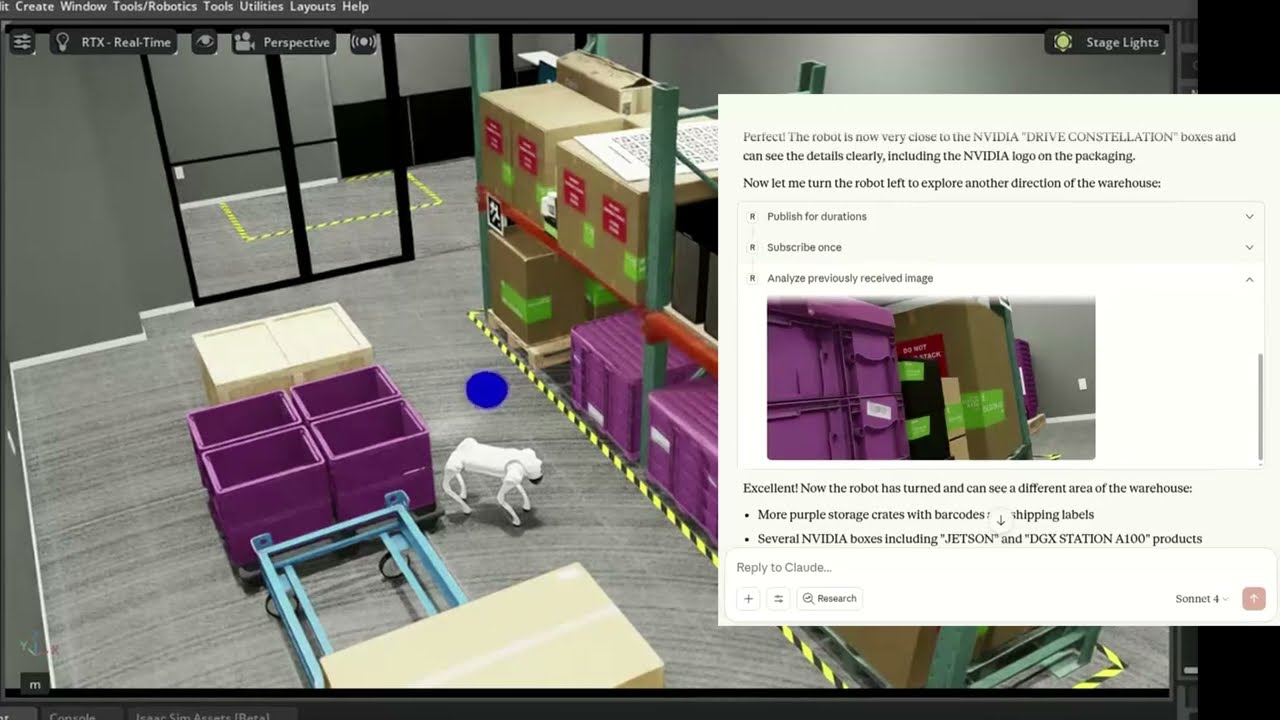
🐕 Example - Controlling Unitree Go2 in NVIDIA Isaac Sim (video)
The MCP server connects Claude to a simulated Unitree Go2 quadruped in NVIDIA Isaac Sim, interpreting natural language commands to navigate and control the robot.
🛠 Getting Started
Follow the installation guide to get started.
ROS-MCP works with Claude Code, Codex CLI, Gemini CLI, Claude Desktop, ChatGPT, Cursor, or any MCP-compatible client.
📚 More Examples & Tutorials
Browse our examples to see the server in action.
We welcome community PRs with new examples and integrations!
🤝 Contributing
We love contributions of all kinds:
- Bug fixes and documentation updates
- New features (e.g., Action support, permissions)
- Additional examples and tutorials
Check out the contributing guidelines and see issues tagged good first issue to get started.
📜 License
This project is licensed under the Apache License 2.0.
Two peas, one chat
Chat with AI about ROS
Opens a chat primed with ROS’s README and setup docs from this page, or add it in Cursor to use its tools.
The Cursor button opens Cursor and asks before it adds the server. Fill in any keys it needs in Cursor’s MCP settings.
Peas in a pod
What are the alternatives to ROS MCP Server?
How ROS MCP Server lines up against its neighbours on the shelf. See every agent helpers and desktop control server.

ROS MCP ServerThis pea
Lets an assistant explore and command a ROS or ROS 2 robot through rosbridge.
- Tools
- 31
- Runs on
- Your computer
- Licence
- Apache-2.0
- Stars
- 1.5K

A numbered scratchpad the model fills in, revises and branches while it works.
- Tools
- 1
- Runs on
- Your computer
- Licence
- MIT / Apache-2.0
- Stars
- 91.6K

Mouse, keyboard, apps, files and PowerShell on a Windows PC, driven by your assistant.
- Tools
- 21
- Runs on
- Your computer
- Licence
- MIT
- Stars
- 10.4K

Tap, swipe, type and read the screen on iOS and Android, real or simulated.
- Tools
- 34
- Runs on
- Your computer
- Licence
- Apache-2.0
- Stars
- 10K

Each coding agent gets its own container and git branch, so several can work at once.
- Tools
- 15
- Runs on
- Your computer
- Licence
- Apache-2.0
- Stars
- 4.1K
Something wrong on this page? Tell us.