
Read and search your Slack channels, threads and DMs, with posting off by default.
- Needs your setup first
- ★ 1.9K GitHub stars
- Last commit 16 Jul 2026
What is Slack MCP Server?
Slack MCP Server (korotovsky/slack-mcp-server) is an open source MCP server that lets AI assistants read, search and optionally post in Slack channels, threads and DMs with your own token.
Dmitrii Korotovskii's server is the most widely used open source way to bring Slack into an assistant. It reads channel and thread history, lists channels and users, searches messages with Slack's filters, shows unread messages and works with user groups and, with browser tokens, your saved items. Long histories come back in pages, and channel and user lists are cached on disk so it starts quickly.
It works with a user token, a bot token, or the pair of browser tokens your Slack session already uses. Posting messages, adding reactions and downloading attachments are not even registered until you set the variable for each one, and posting can be limited to a list of channels. Joining and leaving channels and editing user groups are on by default, so list only the tools you want in SLACK_MCP_ENABLED_TOOLS if that is too much.
- Made by
- Dmitrii Korotovskii (korotovsky) and contributors
- Licence
- MIT
- Latest version
- 1.3.0 (14 May 2026)
- npm package
- slack-mcp-server
- GitHub stars
- 1.9K
- Last commit
- 16 Jul 2026
- Tools
- 22
- Runs on
- Your computer
- Setup checked
- 27 Oct 2026
- Page updated
- 27 Oct 2026
Our check: It needs something our Linux test machine does not have (an account, a desktop app, a Mac or a running service), so on 27 Oct 2026 we read its tools from the source code instead of running this config.
MCP Shelf take
Slack needs something our Linux test machine does not have (an account, an app or a service), so on 27 Oct 2026 we read its source and counted 22 tools. 10 of the 22 only read; the other 12 can change things. It sits 12th of 16 in its category on our shelf by GitHub stars (1.9K).
What can Slack MCP Server read and change?
It can read
- Channels, DMs and threads the token can see
- Users, user groups and, with browser tokens, your saved items
It can change
- Messages and reactions, only when you turn those tools on
- Channel membership (join and leave) and read state
- User groups and saved items
Safer setup: Use SLACK_MCP_ENABLED_TOOLS to register only the read tools you need, leave the posting variables unset, and prefer a user or bot token with narrow scopes.
What's in the pod
What tools does Slack MCP Server have?
We found 22 tools in its source code on 27 Oct 2026. 10 only read. The rest can change things, so keep your app's "ask before each tool call" setting on for them.
How we tested it: Tool list read from the source at commit b88c0de. It did not start in our sandbox, which has no Slack token. Write tools appear only when their variables are set, and saved-item tools only with browser tokens.
Changes things12 tools · Can create, edit, send or delete.
| Tool | What it is for |
|---|---|
conversations_add_message | Posts a message or thread reply. Registered only when SLACK_MCP_ADD_MESSAGE_TOOL is set. |
conversations_join | Joins a public channel. |
conversations_leave | Leaves a channel or conversation. |
conversations_mark | Marks a channel or DM as read. |
reactions_add | Adds an emoji reaction. Registered only when SLACK_MCP_REACTION_TOOL is set. |
reactions_remove | Removes an emoji reaction. Registered only when SLACK_MCP_REACTION_TOOL is set. |
saved_clear_completed | Clears completed saved items. Browser tokens only. |
saved_update | Marks a saved item done or sets its due date. Browser tokens only. |
usergroups_create | Creates a user group (a mention group such as @design). |
usergroups_me | Shows, joins or leaves your own user groups. |
usergroups_update | Changes a user group's name, handle, description or channels. |
usergroups_users_update | Replaces the full member list of a user group. |
Only reads10 tools · Looks things up and changes nothing.
| Tool | What it is for |
|---|---|
attachment_get_data | Downloads a file shared in Slack. Registered only when SLACK_MCP_ATTACHMENT_TOOL is set. |
channels_list | Lists channels of the types you ask for, with search and sorting. |
channels_me | Lists only the channels you are in. |
conversations_history | Reads the messages in a channel or DM, newest first, a page at a time. |
conversations_replies | Reads every reply in a thread. |
conversations_search_messages | Searches messages with filters for channel, person, date and threads. Not available with bot tokens. |
conversations_unreads | Collects unread messages across channels and DMs, with an option for mentions only. Not available with bot tokens. |
saved_list | Lists your Save for Later items. Browser tokens only. |
usergroups_list | Lists the workspace's user groups. |
users_search | Finds people by name, email, display name or user ID. |
Grouped and described by us. The README on GitHub lists the inputs each tool takes.
How do I install Slack MCP Server?
Install steps from the Slack MCP Server README
The project's own instructions, copied from its README on GitHub on 27 Oct 2026 under its MIT licence. They are the source of truth; the ready-made configs further down are built from them. The rest of the README is in the README tab.
Setup Guide
Environment Variables (Quick Reference)
| Variable | Required? | Default | Description |
|---|---|---|---|
SLACK_MCP_XOXC_TOKEN |
Yes* | nil |
Slack browser token (xoxc-...) |
SLACK_MCP_XOXD_TOKEN |
Yes* | nil |
Slack browser cookie d (xoxd-...) |
SLACK_MCP_XOXP_TOKEN |
Yes* | nil |
User OAuth token (xoxp-...) — alternative to xoxc/xoxd |
SLACK_MCP_XOXB_TOKEN |
Yes* | nil |
Bot token (xoxb-...) — alternative to xoxp/xoxc/xoxd. Bot has limited access (invited channels only, no search) |
SLACK_MCP_PORT |
No | 13080 |
Port for the MCP server to listen on |
SLACK_MCP_HOST |
No | 127.0.0.1 |
Host for the MCP server to listen on |
SLACK_MCP_API_KEY |
No | nil |
Bearer token for SSE and HTTP transports |
SLACK_MCP_PROXY |
No | nil |
Proxy URL for outgoing requests |
SLACK_MCP_USER_AGENT |
No | nil |
Custom User-Agent (for Enterprise Slack environments) |
SLACK_MCP_CUSTOM_TLS |
No | nil |
Send custom TLS-handshake to Slack servers based on SLACK_MCP_USER_AGENT or default User-Agent. (for Enterprise Slack environments) |
SLACK_MCP_SERVER_CA |
No | nil |
Path to CA certificate |
SLACK_MCP_SERVER_CA_TOOLKIT |
No | nil |
Inject HTTPToolkit CA certificate to root trust-store for MitM debugging |
SLACK_MCP_SERVER_CA_INSECURE |
No | false |
Trust all insecure requests (NOT RECOMMENDED) |
SLACK_MCP_ADD_MESSAGE_TOOL |
No | nil |
Enable message posting via conversations_add_message by setting it to true for all channels, a comma-separated list of channel IDs to whitelist specific channels, or use ! before a channel ID to allow all except specified ones. If empty, the tool is only registered when explicitly listed in SLACK_MCP_ENABLED_TOOLS. |
SLACK_MCP_ADD_MESSAGE_MARK |
No | nil |
When conversations_add_message is enabled (via SLACK_MCP_ADD_MESSAGE_TOOL or SLACK_MCP_ENABLED_TOOLS), setting this to true will automatically mark sent messages as read. |
SLACK_MCP_ADD_MESSAGE_UNFURLING |
No | nil |
Enable to let Slack unfurl posted links or set comma-separated list of domains e.g. github.com,slack.com to whitelist unfurling only for them. If text contains whitelisted and unknown domain unfurling will be disabled for security reasons. |
SLACK_MCP_REACTION_TOOL |
No | nil |
Enable reactions_add and reactions_remove tools by setting to true for all channels, a comma-separated list of channel IDs to whitelist specific channels, or use ! before a channel ID to allow all except specified ones. If empty, the tools are only registered when explicitly listed in SLACK_MCP_ENABLED_TOOLS. |
SLACK_MCP_ATTACHMENT_TOOL |
No | nil |
Enable the attachment_get_data tool by setting to true, 1, or yes. Does not support channel-level restrictions. If empty, the tool is only registered when explicitly listed in SLACK_MCP_ENABLED_TOOLS. |
SLACK_MCP_MARK_TOOL |
No | nil |
Enable the conversations_mark tool by setting to true or 1. Disabled by default to prevent accidental marking of messages as read. |
SLACK_MCP_USERS_CACHE |
No | ~/Library/Caches/slack-mcp-server/users_cache.json (macOS)~/.cache/slack-mcp-server/users_cache.json (Linux)%LocalAppData%/slack-mcp-server/users_cache.json (Windows) |
Path to the users cache file. Used to cache Slack user information to avoid repeated API calls on startup. |
SLACK_MCP_CHANNELS_CACHE |
No | ~/Library/Caches/slack-mcp-server/channels_cache_v2.json (macOS)~/.cache/slack-mcp-server/channels_cache_v2.json (Linux)%LocalAppData%/slack-mcp-server/channels_cache_v2.json (Windows) |
Path to the channels cache file. Used to cache Slack channel information to avoid repeated API calls on startup. |
SLACK_MCP_LOG_LEVEL |
No | info |
Log-level for stdout or stderr. Valid values are: debug, info, warn, error, panic and fatal |
SLACK_MCP_GOVSLACK |
No | nil |
Set to true to enable GovSlack mode. Routes API calls to slack-gov.com endpoints instead of slack.com for FedRAMP-compliant government workspaces. |
SLACK_MCP_ENABLED_TOOLS |
No | nil |
Comma-separated list of tools to register. If empty, all read-only tools and usergroups tools are registered; write tools (conversations_add_message, reactions_add, reactions_remove, attachment_get_data) require their specific env var OR must be explicitly listed here. When a write tool is listed here, it's enabled without channel restrictions. Available tools: conversations_history, conversations_replies, conversations_add_message, reactions_add, reactions_remove, attachment_get_data, conversations_search_messages, channels_list, usergroups_list, usergroups_me, usergroups_create, usergroups_update, usergroups_users_update. |
*You need one of: xoxp (user), xoxb (bot), or both xoxc/xoxd tokens for authentication.
Limitations matrix & Cache
| Users Cache | Channels Cache | Limitations |
|---|---|---|
| :x: | :x: | No cache, No LLM context enhancement with user data, tool channels_list will be fully not functional. Tools conversations_* will have limited capabilities and you won't be able to search messages by @userHandle or #channel-name, getting messages by @userHandle or #channel-name won't be available either. |
| :white_check_mark: | :x: | No channels cache, tool channels_list will be fully not functional. Tools conversations_* will have limited capabilities and you won't be able to search messages by @userHandle or #channel-name, getting messages by @userHandle or #channel-name won't be available either. |
| :white_check_mark: | :white_check_mark: | No limitations, fully functional Slack MCP Server. |
Debugging Tools
# Run the inspector with stdio transport
npx @modelcontextprotocol/inspector go run mcp/mcp-server.go --transport stdio

# View logs
tail -n 20 -f ~/Library/Logs/Claude/mcp*.log
What you need first
- A Slack token: a user OAuth token (xoxp-) is the cleanest option, a bot token (xoxb-) works with fewer features
- Node.js, for npx
Add Slack MCP Server to your app
Pick your app for a ready-to-paste snippet and where it goes, built from the steps above.
Where it goes: Your terminal, in the project folder
claude mcp add slack -e SLACK_MCP_XOXP_TOKEN=xoxp-... -- npx -y slack-mcp-server@latest --transport stdioA user token (xoxp) from your own Slack app is the cleanest choice. A bot token (xoxb) only sees channels the bot was invited to and cannot search.
Where it goes: ~/.cursor/mcp.json, or .cursor/mcp.json in a project
{
  "mcpServers": {
    "slack": {
      "command": "npx",
      "args": [
        "-y",
        "slack-mcp-server@latest",
        "--transport",
        "stdio"
      ],
      "env": {
        "SLACK_MCP_XOXP_TOKEN": "xoxp-..."
      }
    }
  }
}
Where it goes: claude_desktop_config.json (Settings → Developer → Edit Config)
{
  "mcpServers": {
    "slack": {
      "command": "npx",
      "args": [
        "-y",
        "slack-mcp-server@latest",
        "--transport",
        "stdio"
      ],
      "env": {
        "SLACK_MCP_XOXP_TOKEN": "xoxp-..."
      }
    }
  }
}
Where it goes: .vscode/mcp.json in your project
{
  "servers": {
    "slack": {
      "type": "stdio",
      "command": "npx",
      "args": [
        "-y",
        "slack-mcp-server@latest",
        "--transport",
        "stdio"
      ],
      "env": {
        "SLACK_MCP_XOXP_TOKEN": "xoxp-..."
      }
    }
  }
}
Where it goes: ~/.codeium/windsurf/mcp_config.json
{
  "mcpServers": {
    "slack": {
      "command": "npx",
      "args": [
        "-y",
        "slack-mcp-server@latest",
        "--transport",
        "stdio"
      ],
      "env": {
        "SLACK_MCP_XOXP_TOKEN": "xoxp-..."
      }
    }
  }
}
Where it goes: Not supported
Not as installed here. The server can run over HTTP or SSE on port 13080, but ChatGPT cannot send your Slack token, so keep it to local apps.
Set SLACK_MCP_ADD_MESSAGE_TOOL to "true", or to a comma-separated list of channel IDs, to allow posting. Message search does not work with a bot token. Check your workspace rules before using browser tokens (xoxc and xoxd).
Checked against the project's own install docs on 27 Oct 2026: korotovsky/slack-mcp-server README.
New to this? See the setup guides for Claude Code, Cursor, Claude Desktop and ChatGPT.
Slack MCP Server not working? Common fixes
- Search or unreads is missing
- Those tools are not offered with a bot token. Use a user OAuth token or browser tokens.
- Posting does not work
- conversations_add_message is not registered by default. Set SLACK_MCP_ADD_MESSAGE_TOOL, then restart the client.
- Startup is slow the first time
- It caches users and channels on the first run. Later starts read the cache, which refreshes every 24 hours by default (SLACK_MCP_CACHE_TTL).
- Requests fail on an Enterprise Grid workspace
- Set SLACK_MCP_USER_AGENT to your browser's user agent, and SLACK_MCP_CUSTOM_TLS if requests are still rejected.
How do I configure Slack MCP Server?
Names are exactly as the project spells them. Required ones are marked.
| Setting | What it does |
|---|---|
SLACK_MCP_XOXP_TOKENEnvironment variable | A user OAuth token (xoxp-) from a Slack app you create. One of the token options is required.xoxp-... |
SLACK_MCP_XOXB_TOKENEnvironment variable | A bot token (xoxb-). The bot sees only channels it is invited to, and search and unreads are not available. |
SLACK_MCP_XOXC_TOKEN / SLACK_MCP_XOXD_TOKENEnvironment variable | The token and d cookie from a signed-in Slack browser session, used together. No app needed, but check your workspace's rules first. |
SLACK_MCP_ADD_MESSAGE_TOOLEnvironment variable | Turns on posting: true for every channel, a list of channel IDs to allow, or IDs starting with ! to exclude.C0123456789,C0987654321 |
SLACK_MCP_REACTION_TOOLEnvironment variable | Turns on adding and removing reactions. |
SLACK_MCP_ATTACHMENT_TOOLEnvironment variable | Turns on downloading attachments. |
SLACK_MCP_ENABLED_TOOLSEnvironment variable | A comma-separated list of the only tools to register.conversations_history,conversations_replies,channels_list |
--transportCommand line flag | stdio for a client that starts the server, or sse or http to run it as a service on SLACK_MCP_HOST and SLACK_MCP_PORT (13080), protected by SLACK_MCP_API_KEY.--transport stdio |
Slack MCP Server FAQ
How do I add the Slack MCP Server to Claude Code?
Create a Slack app with the scopes you need, copy its user token, then run claude mcp add slack -e SLACK_MCP_XOXP_TOKEN=xoxp-your-token -- npx -y slack-mcp-server@latest --transport stdio.
Which Slack token should I use with the Slack MCP Server?
A user OAuth token (xoxp) from your own Slack app is the cleanest. A bot token works with invited channels only and no search. Browser tokens (xoxc and xoxd) need no app but act as your whole session, so check your workspace's rules first.
Is this Slack's official MCP server?
No. It is an independent open source project by Dmitrii Korotovskii and contributors, MIT licensed, and not made by Slack.
Can the Slack MCP Server post messages?
Only if you allow it. Posting is off by default; set SLACK_MCP_ADD_MESSAGE_TOOL to true, or to a list of channel IDs, to turn it on for those channels.
Is the Slack MCP Server safe?
Leave posting off, register only the read tools you need with SLACK_MCP_ENABLED_TOOLS and use a token with narrow scopes. Messages can carry instructions aimed at the model, so read before acting.
Is the Slack MCP Server free?
Yes. It is MIT licensed and talks to Slack's API with your own token, so there is nothing to pay beyond your Slack plan.
Why is search missing in the Slack MCP Server?
Search and unreads need a user or browser token. With a bot token those tools are not available, because Slack does not let bots search messages.
Why is the Slack MCP Server slow to start the first time?
It builds a cache of users and channels on first run, which takes a while in large workspaces. Later starts reuse the cache and are quick.
Slack MCP Server README
This is the project's own README from korotovsky/slack-mcp-server, written by Dmitrii Korotovskii (korotovsky) and contributors, and shared under its MIT licence. We copied it on 27 Oct 2026, so the version on GitHub may be newer.
Slack MCP Server
Model Context Protocol (MCP) server for Slack Workspaces. The most powerful MCP Slack server — supports Stdio, SSE and HTTP transports, proxy settings, DMs, Group DMs, Smart History fetch (by date or count), may work via OAuth or in complete stealth mode with no permissions and scopes in Workspace 😏.
Important:
We need your support! Each month, over 30,000 engineers visit this repository, and more than 9,000 are already using it.If you appreciate the work our contributors have put into this project, please consider giving the repository a star.
This feature-rich Slack MCP Server has:
- Stealth and OAuth Modes: Run the server without requiring additional permissions or bot installations (stealth mode), or use secure OAuth tokens for access without needing to refresh or extract tokens from the browser (OAuth mode).
- Enterprise Workspaces Support: Possibility to integrate with Enterprise Slack setups.
- Channel and Thread Support with
#Name@Lookup: Fetch messages from channels and threads, including activity messages, and retrieve channels using their names (e.g., #general) as well as their IDs. - Smart History: Fetch messages with pagination by date (d1, 7d, 1m) or message count.
- Unread Messages: Get all unread messages across channels efficiently with priority sorting (DMs > partner channels > internal), @mention filtering, and mark-as-read support.
- Search Messages: Search messages in channels, threads, and DMs using various filters like date, user, and content.
- Safe Message Posting: The
conversations_add_messagetool is disabled by default for safety. Enable it via an environment variable, with optional channel restrictions. - DM and Group DM support: Retrieve direct messages and group direct messages.
- Embedded user information: Embed user information in messages, for better context.
- Cache support: Cache users and channels for faster access.
- Stdio/SSE/HTTP Transports & Proxy Support: Use the server with any MCP client that supports Stdio, SSE or HTTP transports, and configure it to route outgoing requests through a proxy if needed.
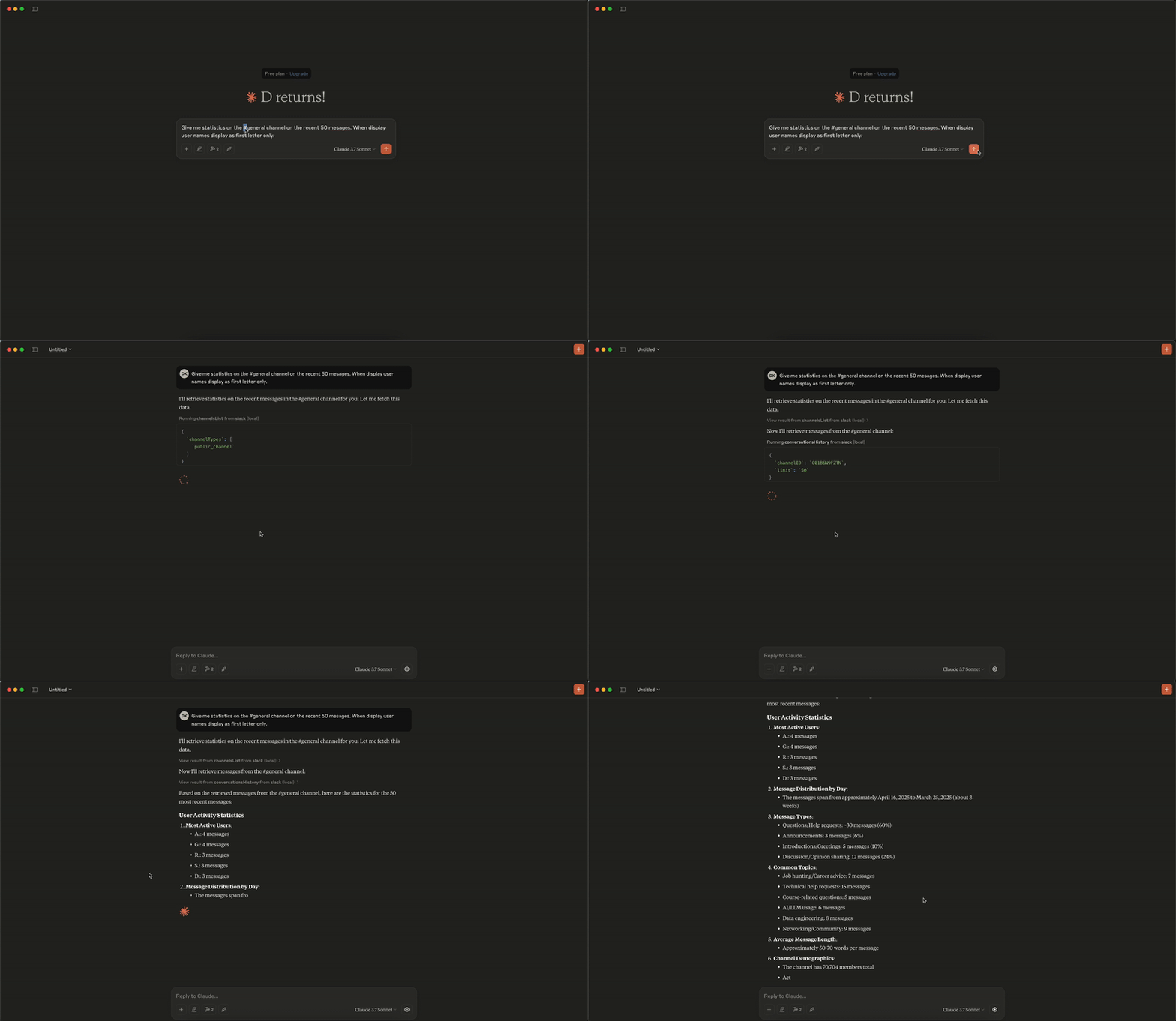
Analytics Demo
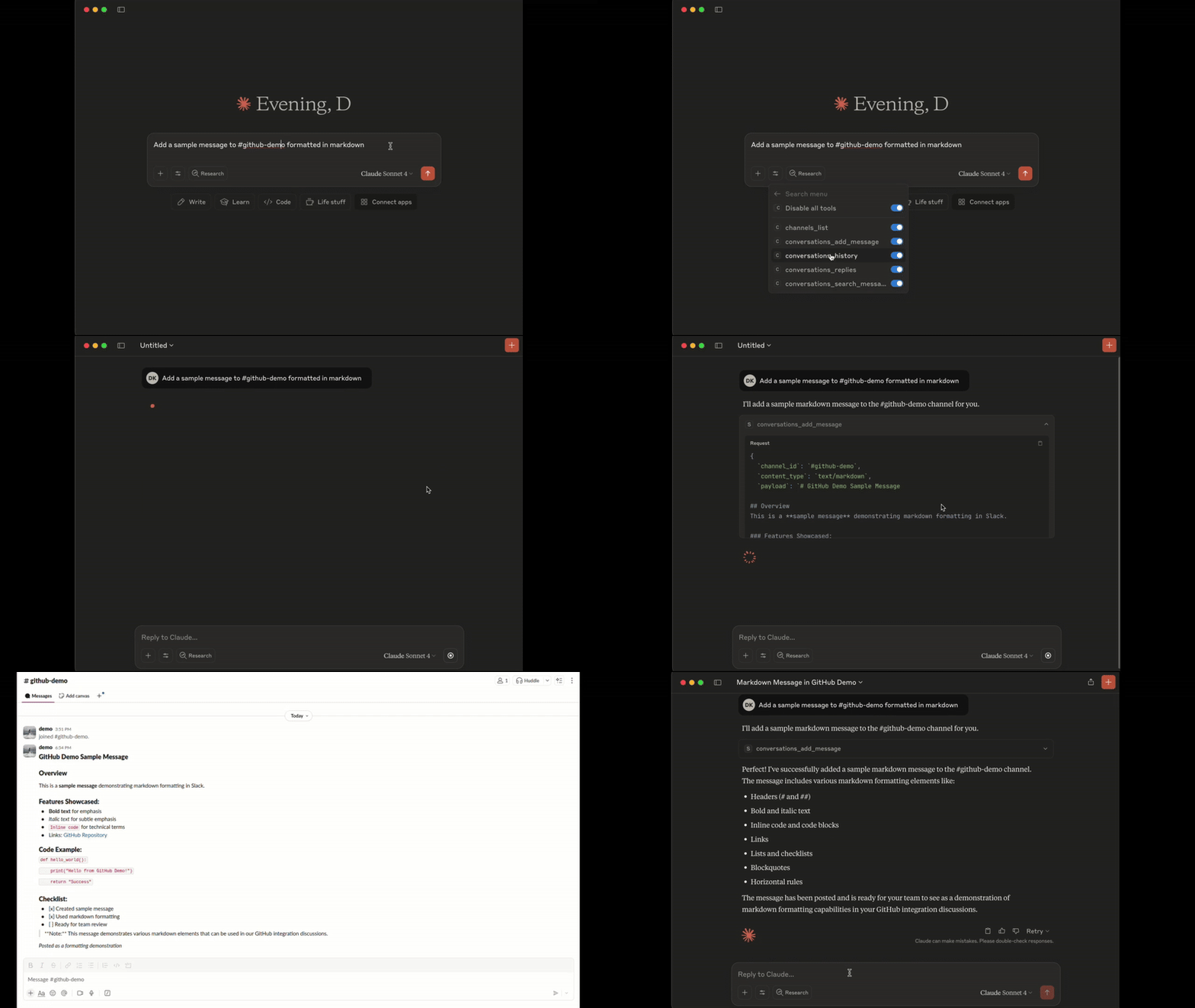
Add Message Demo
Tools
1. conversations_history:
Get messages from the channel (or DM) by channel_id, the last row/column in the response is used as 'cursor' parameter for pagination if not empty
- Parameters:
channel_id(string, required): -channel_id(string): ID of the channel in format Cxxxxxxxxxx or its name starting with#...or@...aka#generalor@username_dm.include_activity_messages(boolean, default: false): If true, the response will include activity messages such aschannel_joinorchannel_leave. Default is boolean false.cursor(string, optional): Cursor for pagination. Use the value of the last row and column in the response as next_cursor field returned from the previous request.limit(string, default: "1d"): Limit of messages to fetch in format of maximum ranges of time (e.g. 1d - 1 day, 1w - 1 week, 30d - 30 days, 90d - 90 days which is a default limit for free tier history) or number of messages (e.g. 50). Must be empty when 'cursor' is provided.
2. conversations_replies:
Get a thread of messages posted to a conversation by channelID and thread_ts, the last row/column in the response is used as cursor parameter for pagination if not empty.
- Parameters:
channel_id(string, required): ID of the channel in formatCxxxxxxxxxxor its name starting with#...or@...aka#generalor@username_dm.thread_ts(string, required): Unique identifier of either a thread’s parent message or a message in the thread. ts must be the timestamp in format1234567890.123456of an existing message with 0 or more replies.include_activity_messages(boolean, default: false): If true, the response will include activity messages such as 'channel_join' or 'channel_leave'. Default is boolean false.cursor(string, optional): Cursor for pagination. Use the value of the last row and column in the response as next_cursor field returned from the previous request.limit(string, default: "1d"): Limit of messages to fetch in format of maximum ranges of time (e.g. 1d - 1 day, 1w - 1 week, 30d - 30 days, 90d - 90 days which is a default limit for free tier history) or number of messages (e.g. 50). Must be empty when 'cursor' is provided.
3. conversations_add_message
Add a message to a public channel, private channel, or direct message (DM, or IM) conversation by channel_id and thread_ts.
Note: Posting messages is disabled by default for safety. To enable, set the
SLACK_MCP_ADD_MESSAGE_TOOLenvironment variable. If set to a comma-separated list of channel IDs, posting is enabled only for those specific channels. See the Environment Variables section below for details.
- Parameters:
channel_id(string, required): ID of the channel in formatCxxxxxxxxxxor its name starting with#...or@...aka#generalor@username_dm.thread_ts(string, optional): Unique identifier of either a thread’s parent message or a message in the thread_ts must be the timestamp in format1234567890.123456of an existing message with 0 or more replies. Optional, if not provided the message will be added to the channel itself, otherwise it will be added to the thread.payload(string, required): Message payload in specified content_type format. Example: 'Hello, world!' for text/plain or '# Hello, world!' for text/markdown.content_type(string, default: "text/markdown"): Content type of the message. Default is 'text/markdown'. Allowed values: 'text/markdown', 'text/plain'.
4. conversations_search_messages
Search messages in a public channel, private channel, or direct message (DM, or IM) conversation using filters. All filters are optional, if not provided then search_query is required.
Note: This tool is not available when using bot tokens (
xoxb-*). Bot tokens cannot use thesearch.messagesAPI.
- Parameters:
search_query(string, optional): Search query to filter messages. Example: 'marketing report' or full URL of Slack message e.g. 'https://slack.com/archives/C1234567890/p1234567890123456', then the tool will return a single message matching given URL, herewith all other parameters will be ignored.filter_in_channel(string, optional): Filter messages in a specific channel by its ID or name. Example:C1234567890or#general. If not provided, all channels will be searched.filter_in_im_or_mpim(string, optional): Filter messages in a direct message (DM) or multi-person direct message (MPIM) conversation by its ID or name. Example:D1234567890or@username_dm. If not provided, all DMs and MPIMs will be searched.filter_users_with(string, optional): Filter messages with a specific user by their ID or display name in threads and DMs. Example:U1234567890or@username. If not provided, all threads and DMs will be searched.filter_users_from(string, optional): Filter messages from a specific user by their ID or display name. Example:U1234567890or@username. If not provided, all users will be searched.filter_date_before(string, optional): Filter messages sent before a specific date in formatYYYY-MM-DD. Example:2023-10-01,July,YesterdayorToday. If not provided, all dates will be searched.filter_date_after(string, optional): Filter messages sent after a specific date in formatYYYY-MM-DD. Example:2023-10-01,July,YesterdayorToday. If not provided, all dates will be searched.filter_date_on(string, optional): Filter messages sent on a specific date in formatYYYY-MM-DD. Example:2023-10-01,July,YesterdayorToday. If not provided, all dates will be searched.filter_date_during(string, optional): Filter messages sent during a specific period in formatYYYY-MM-DD. Example:July,YesterdayorToday. If not provided, all dates will be searched.filter_threads_only(boolean, default: false): If true, the response will include only messages from threads. Default is boolean false.cursor(string, default: ""): Cursor for pagination. Use the value of the last row and column in the response as next_cursor field returned from the previous request.limit(number, default: 20): The maximum number of items to return. Must be an integer between 1 and 100.
5. channels_list:
Get list of channels
- Parameters:
channel_types(string, required): Comma-separated channel types. Allowed values:mpim,im,public_channel,private_channel. Example:public_channel,private_channel,imsort(string, optional): Type of sorting. Allowed values:popularity- sort by number of members/participants in each channel.limit(number, default: 100): The maximum number of items to return. Must be an integer between 1 and 1000 (maximum 999).cursor(string, optional): Cursor for pagination. Use the value of the last row and column in the response as next_cursor field returned from the previous request.
6. reactions_add:
Add an emoji reaction to a message in a public channel, private channel, or direct message (DM, or IM) conversation.
Note: Adding reactions is disabled by default for safety. To enable, set the
SLACK_MCP_REACTION_TOOLenvironment variable. If set to a comma-separated list of channel IDs, reactions are enabled only for those specific channels. See the Environment Variables section below for details.
- Parameters:
channel_id(string, required): ID of the channel in formatCxxxxxxxxxxor its name starting with#...or@...aka#generalor@username_dm.timestamp(string, required): Timestamp of the message to add reaction to, in format1234567890.123456.emoji(string, required): The name of the emoji to add as a reaction (without colons). Example:thumbsup,heart,rocket.
7. reactions_remove:
Remove an emoji reaction from a message in a public channel, private channel, or direct message (DM, or IM) conversation.
Note: Removing reactions follows the same permission model as
reactions_add. To enable, set theSLACK_MCP_REACTION_TOOLenvironment variable.
- Parameters:
channel_id(string, required): ID of the channel in formatCxxxxxxxxxxor its name starting with#...or@...aka#generalor@username_dm.timestamp(string, required): Timestamp of the message to remove reaction from, in format1234567890.123456.emoji(string, required): The name of the emoji to remove as a reaction (without colons). Example:thumbsup,heart,rocket.
8. users_search:
Search for users by name, email, or display name. Returns user details and DM channel ID if available.
Note: For OAuth tokens (
xoxp/xoxb), this tool searches the local users cache using pattern matching. For browser session tokens (xoxc/xoxd), it uses the Slack edge API for real-time search.
Parameters:
query(string, required): Search query - matches against real name, display name, username, or email.limit(number, default: 10): Maximum number of results to return (1-100).
Returns: CSV with fields:
UserID: User ID (e.g.,U1234567890)UserName: Slack usernameRealName: User's real nameDisplayName: User's display nameEmail: User's email addressTitle: User's job titleDMChannelID: DM channel ID if available in cache (for quick messaging)
9. usergroups_list:
List all user groups (subteams) in the workspace.
Parameters:
include_users(boolean, default: false): Include list of user IDs in each group.include_count(boolean, default: true): Include user count for each group.include_disabled(boolean, default: false): Include disabled/archived groups.
Returns: CSV with fields: id, name, handle, description, user_count, is_external
Required OAuth scopes:
usergroups:read
10. usergroups_create:
Create a new user group in the workspace.
Parameters:
name(string, required): Name of the user group (e.g., "Engineering Team").handle(string, optional): Mention handle without @ (e.g., "engineering"). If not provided, Slack will auto-generate one.description(string, optional): Purpose or description of the group.channels(string, optional): Comma-separated channel IDs for default channels where group mentions will be highlighted.
Returns: JSON with created group details (id, name, handle, description)
Required OAuth scopes:
usergroups:write
11. usergroups_update:
Update an existing user group's metadata.
Parameters:
usergroup_id(string, required): ID of the user group (e.g., "S1234567890").name(string, optional): New name for the group.handle(string, optional): New mention handle.description(string, optional): New description.channels(string, optional): New default channels (comma-separated IDs). This replaces existing default channels.
Returns: JSON with updated group details
Required OAuth scopes:
usergroups:write
12. usergroups_users_update:
Update the members of a user group. This replaces all existing members.
Parameters:
usergroup_id(string, required): ID of the user group (e.g., "S1234567890").users(string, required): Comma-separated user IDs to set as members (e.g., "U123,U456,U789").
Returns: JSON with updated group details including new user list
Required OAuth scopes:
usergroups:write
13. usergroups_me:
Manage your user group membership: list groups you're in, join a group, or leave a group.
Parameters:
action(string, required): Action to perform -listto see your groups,jointo add yourself,leaveto remove yourself.usergroup_id(string, optional): ID of the user group (e.g., "S1234567890"). Required forjoinandleaveactions.
Returns:
- For
list: CSV with groups you're a member of - For
join/leave: JSON with result message and updated group info
- For
Required OAuth scopes:
usergroups:read(for list),usergroups:read+usergroups:write(for join/leave)
14. conversations_unreads
Get unread messages across all channels efficiently. Uses a single API call to identify channels with unreads, then fetches only those messages. Results are prioritized: DMs > partner channels (Slack Connect) > internal channels.
Note: This tool works best with browser session tokens (
xoxc/xoxd), which use the efficientclient.countsAPI. For standard OAuth tokens (xoxp), a fallback method usingconversations.infois used, which requires one API call per channel and may be slower for large workspaces. Not available with bot tokens (xoxb).
- Parameters:
include_messages(boolean, default: true): If true, returns the actual unread messages. If false, returns only a summary of channels with unreads.channel_types(string, default: "all"): Filter by channel type:all,dm(direct messages),group_dm(group DMs),partner(externally shared channels),internal(regular workspace channels).max_channels(number, default: 50): Maximum number of channels to fetch unreads from.max_messages_per_channel(number, default: 10): Maximum messages to fetch per channel.mentions_only(boolean, default: false): If true, only returns channels where you have @mentions. Note: This filter only works with browser tokens; OAuth tokens will return all unread channels.
15. conversations_mark
Mark a channel or DM as read.
Note: Marking messages as read is disabled by default for safety. To enable, set the
SLACK_MCP_MARK_TOOLenvironment variable totrueor1. See the Environment Variables section below for details.
- Parameters:
channel_id(string, required): ID of the channel in formatCxxxxxxxxxxor its name starting with#...or@...(e.g.,#general,@username).ts(string, optional): Timestamp of the message to mark as read up to. If not provided, marks all messages as read.
16. saved_list
List saved items from Slack's "Save for Later" panel. Returns items the user has saved, with optional message content. This replaces the deprecated stars.list API (changelog).
Note: This tool requires browser session tokens (
xoxc/xoxd). It is not available with standard OAuth (xoxp) or bot (xoxb) tokens.
- Parameters:
filter(string, default"saved"): Filter saved items:"saved"(active/in-progress),"completed"(marked done),"archived".limit(number, default50): Maximum number of items to return. Auto-paginates.include_messages(boolean, defaulttrue): If true, fetches the actual saved message content. If false, returns metadata only.max_messages_per_item(number, default5): Max messages to fetch per saved item (for thread replies).
17. saved_update
Update a saved item: mark as completed, set a due date/reminder, or both. Use item_id and ts values from saved_list output. This replaces the deprecated stars.add/stars.remove APIs.
Note: This tool requires browser session tokens (
xoxc/xoxd). It is not available with standard OAuth (xoxp) or bot (xoxb) tokens.
- Parameters:
item_id(string, required): Channel/DM ID where the saved message lives (fromsaved_listoutput).ts(string, required): Message timestamp of the saved item (fromsaved_listoutput).mark(string, optional): Set to"completed"to mark the item as done.date_due(number, optional): Unix timestamp for due date/reminder. Set to0to clear.
18. saved_clear_completed
Clear all completed saved items from the "Save for Later" panel. This is a bulk operation that removes all items with state="completed".
Note: This tool requires browser session tokens (
xoxc/xoxd). It is not available with standard OAuth (xoxp) or bot (xoxb) tokens.
- Parameters: None.
Resources
The Slack MCP Server exposes two special directory resources for easy access to workspace metadata:
1. slack://<workspace>/channels — Directory of Channels
Fetches a CSV directory of all channels in the workspace, including public channels, private channels, DMs, and group DMs.
- URI:
slack://<workspace>/channels - Format:
text/csv - Fields:
id: Channel ID (e.g.,C1234567890)name: Channel name (e.g.,#general,@username_dm)topic: Channel topic (if any)purpose: Channel purpose/descriptionmemberCount: Number of members in the channel
2. slack://<workspace>/users — Directory of Users
Fetches a CSV directory of all users in the workspace.
- URI:
slack://<workspace>/users - Format:
text/csv - Fields:
userID: User ID (e.g.,U1234567890)userName: Slack username (e.g.,john)realName: User’s real name (e.g.,John Doe)
Setup Guide
Environment Variables (Quick Reference)
| Variable | Required? | Default | Description |
|---|---|---|---|
SLACK_MCP_XOXC_TOKEN |
Yes* | nil |
Slack browser token (xoxc-...) |
SLACK_MCP_XOXD_TOKEN |
Yes* | nil |
Slack browser cookie d (xoxd-...) |
SLACK_MCP_XOXP_TOKEN |
Yes* | nil |
User OAuth token (xoxp-...) — alternative to xoxc/xoxd |
SLACK_MCP_XOXB_TOKEN |
Yes* | nil |
Bot token (xoxb-...) — alternative to xoxp/xoxc/xoxd. Bot has limited access (invited channels only, no search) |
SLACK_MCP_PORT |
No | 13080 |
Port for the MCP server to listen on |
SLACK_MCP_HOST |
No | 127.0.0.1 |
Host for the MCP server to listen on |
SLACK_MCP_API_KEY |
No | nil |
Bearer token for SSE and HTTP transports |
SLACK_MCP_PROXY |
No | nil |
Proxy URL for outgoing requests |
SLACK_MCP_USER_AGENT |
No | nil |
Custom User-Agent (for Enterprise Slack environments) |
SLACK_MCP_CUSTOM_TLS |
No | nil |
Send custom TLS-handshake to Slack servers based on SLACK_MCP_USER_AGENT or default User-Agent. (for Enterprise Slack environments) |
SLACK_MCP_SERVER_CA |
No | nil |
Path to CA certificate |
SLACK_MCP_SERVER_CA_TOOLKIT |
No | nil |
Inject HTTPToolkit CA certificate to root trust-store for MitM debugging |
SLACK_MCP_SERVER_CA_INSECURE |
No | false |
Trust all insecure requests (NOT RECOMMENDED) |
SLACK_MCP_ADD_MESSAGE_TOOL |
No | nil |
Enable message posting via conversations_add_message by setting it to true for all channels, a comma-separated list of channel IDs to whitelist specific channels, or use ! before a channel ID to allow all except specified ones. If empty, the tool is only registered when explicitly listed in SLACK_MCP_ENABLED_TOOLS. |
SLACK_MCP_ADD_MESSAGE_MARK |
No | nil |
When conversations_add_message is enabled (via SLACK_MCP_ADD_MESSAGE_TOOL or SLACK_MCP_ENABLED_TOOLS), setting this to true will automatically mark sent messages as read. |
SLACK_MCP_ADD_MESSAGE_UNFURLING |
No | nil |
Enable to let Slack unfurl posted links or set comma-separated list of domains e.g. github.com,slack.com to whitelist unfurling only for them. If text contains whitelisted and unknown domain unfurling will be disabled for security reasons. |
SLACK_MCP_REACTION_TOOL |
No | nil |
Enable reactions_add and reactions_remove tools by setting to true for all channels, a comma-separated list of channel IDs to whitelist specific channels, or use ! before a channel ID to allow all except specified ones. If empty, the tools are only registered when explicitly listed in SLACK_MCP_ENABLED_TOOLS. |
SLACK_MCP_ATTACHMENT_TOOL |
No | nil |
Enable the attachment_get_data tool by setting to true, 1, or yes. Does not support channel-level restrictions. If empty, the tool is only registered when explicitly listed in SLACK_MCP_ENABLED_TOOLS. |
SLACK_MCP_MARK_TOOL |
No | nil |
Enable the conversations_mark tool by setting to true or 1. Disabled by default to prevent accidental marking of messages as read. |
SLACK_MCP_USERS_CACHE |
No | ~/Library/Caches/slack-mcp-server/users_cache.json (macOS)~/.cache/slack-mcp-server/users_cache.json (Linux)%LocalAppData%/slack-mcp-server/users_cache.json (Windows) |
Path to the users cache file. Used to cache Slack user information to avoid repeated API calls on startup. |
SLACK_MCP_CHANNELS_CACHE |
No | ~/Library/Caches/slack-mcp-server/channels_cache_v2.json (macOS)~/.cache/slack-mcp-server/channels_cache_v2.json (Linux)%LocalAppData%/slack-mcp-server/channels_cache_v2.json (Windows) |
Path to the channels cache file. Used to cache Slack channel information to avoid repeated API calls on startup. |
SLACK_MCP_LOG_LEVEL |
No | info |
Log-level for stdout or stderr. Valid values are: debug, info, warn, error, panic and fatal |
SLACK_MCP_GOVSLACK |
No | nil |
Set to true to enable GovSlack mode. Routes API calls to slack-gov.com endpoints instead of slack.com for FedRAMP-compliant government workspaces. |
SLACK_MCP_ENABLED_TOOLS |
No | nil |
Comma-separated list of tools to register. If empty, all read-only tools and usergroups tools are registered; write tools (conversations_add_message, reactions_add, reactions_remove, attachment_get_data) require their specific env var OR must be explicitly listed here. When a write tool is listed here, it's enabled without channel restrictions. Available tools: conversations_history, conversations_replies, conversations_add_message, reactions_add, reactions_remove, attachment_get_data, conversations_search_messages, channels_list, usergroups_list, usergroups_me, usergroups_create, usergroups_update, usergroups_users_update. |
*You need one of: xoxp (user), xoxb (bot), or both xoxc/xoxd tokens for authentication.
Limitations matrix & Cache
| Users Cache | Channels Cache | Limitations |
|---|---|---|
| :x: | :x: | No cache, No LLM context enhancement with user data, tool channels_list will be fully not functional. Tools conversations_* will have limited capabilities and you won't be able to search messages by @userHandle or #channel-name, getting messages by @userHandle or #channel-name won't be available either. |
| :white_check_mark: | :x: | No channels cache, tool channels_list will be fully not functional. Tools conversations_* will have limited capabilities and you won't be able to search messages by @userHandle or #channel-name, getting messages by @userHandle or #channel-name won't be available either. |
| :white_check_mark: | :white_check_mark: | No limitations, fully functional Slack MCP Server. |
Debugging Tools
# Run the inspector with stdio transport
npx @modelcontextprotocol/inspector go run mcp/mcp-server.go --transport stdio

# View logs
tail -n 20 -f ~/Library/Logs/Claude/mcp*.log
Security
- Never share API tokens
- Keep .env files secure and private
License
Licensed under MIT - see LICENSE file. This is not an official Slack product.
Two peas, one chat
Chat with AI about Slack
Opens a chat primed with Slack’s README and setup docs from this page, or add it in Cursor to use its tools.
The Cursor button opens Cursor and asks before it adds the server. Fill in any keys it needs in Cursor’s MCP settings.
Peas in a pod
What are the alternatives to Slack MCP Server?
How Slack MCP Server lines up against its neighbours on the shelf. See every knowledge and work apps server.

Slack MCP ServerThis pea
Read and search your Slack channels, threads and DMs, with posting off by default.
- Tools
- 22
- Runs on
- Your computer
- Licence
- MIT
- Stars
- 1.9K

A Mac menu bar app that shares Calendar, Messages, Notes, Reminders and more with your assistant.
- Tools
- 56
- Runs on
- Your computer
- Licence
- MIT
- Stars
- 1.8K

One folder of Markdown that every agent on a team can read, with access rules.
- Tools
- 2
- Runs on
- Hosted
- Licence
- Apache-2.0
- Stars
- 1.7K

Records and transcribes meetings on your device, then lets an assistant search them.
- Tools
- 34
- Runs on
- Your computer
- Licence
- MIT
- Stars
- 1.6K

Ask an assistant about your Garmin activities, sleep, recovery and training.
- Tools
- 20
- Runs on
- Your computer
- Licence
- MIT
- Stars
- 1.4K
Notion's own server: search, read and update pages and databases.
- Tools
- 24
- Runs on
- Hosted or your computer
- Licence
- MIT
- Stars
- 4.7K
Something wrong on this page? Tell us.